
Overview
The Costing File Data is the foundation of your e-commerce reconciliation engine. Without accurate SKU-level costing, it is impossible to calculate true net profit or identify exactly where your marketplace settlements are leaking money.
This template allows you to map every unique Seller SKU to its specific Cost Price, enabling our reconciliation sheets to automate your profit analysis across Amazon, Flipkart, Meesho, and other marketplaces.
Why This Template is Essential
- Accurate Profit Tracking: Automatically calculates “Net Profit after Deductions” by subtracting the product cost from the marketplace settlement.
- Massive Time Savings: Instead of manually entering costs for every order, you upload this master list once, and all reconciliation sheets fetch the data automatically.
- Error Prevention: Eliminates the risk of using outdated or incorrect pricing during settlement analysis.
Template Structure Explained
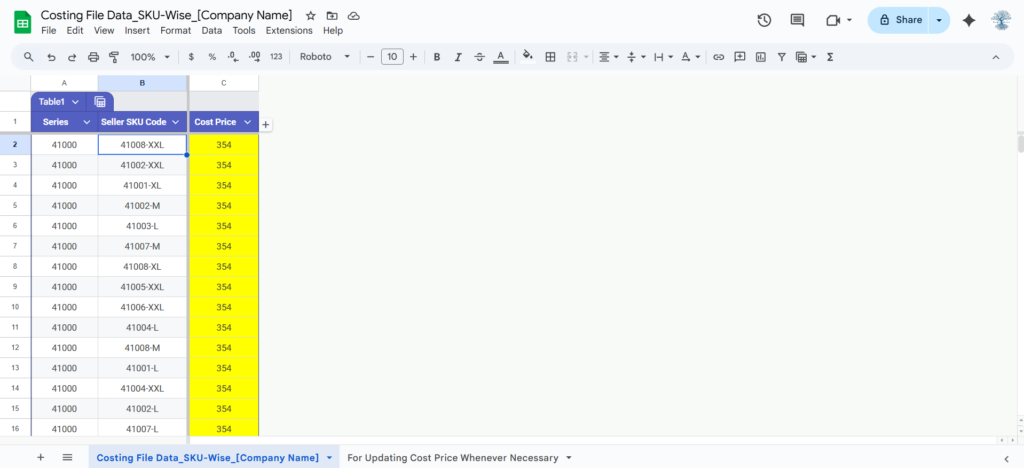
The template consists of three critical columns that must be filled accurately:
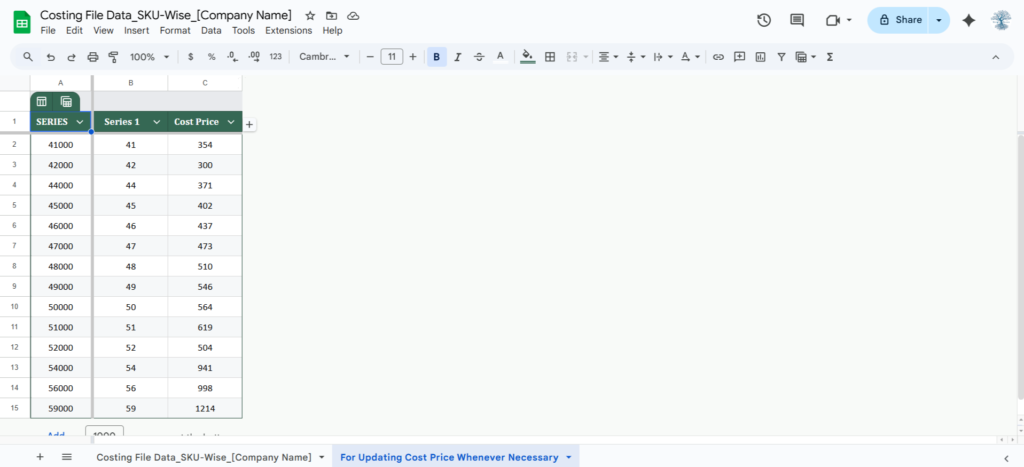
- Series: Use this for internal categorization (e.g., “Men’s Wear,” “Electronics,” or numerical series like 41000, 42000) to help you filter data later.
- Seller SKU Code: This must exactly match the SKU codes used in your marketplace seller panels (Amazon/Flipkart/Meesho). Even a small difference like a hyphen or space will prevent the reconciliation sheet from finding the cost.
- Cost Price: Enter the landing cost per unit (including manufacturing/procurement + inbound GST).
How to Use This Template (Step-by-Step)
Step 1: Data Entry
- Open your unique copy of the Costing File Data sheet.
- List every SKU you currently sell on any marketplace.
- Ensure the Cost Price is the most recent and accurate figure.
Step 2: Syncing with Reconciliation Sheets
- Once your Costing File is ready, copy its URL.
- Open your Marketplace Reconciliation Sheet (e.g., Amazon Payment Recon).
- Navigate to the ‘Settings‘ or ‘Master Data‘ tab and paste the link.
- The sheet will now use a VLOOKUP or IMPORTRANGE function to pull these costs automatically.
Step 3: Regular Updates
- Whenever you launch a new SKU or your procurement costs change, update this master file. All your linked reconciliation sheets will update in real-time.
Common Mistakes to Avoid
- Duplicate SKUs: Ensure each SKU appears only once in this list to avoid calculation errors.
- Incorrect SKU Format: If your marketplace SKU is TSHIRT-RED-L, do not enter it as tshirt_red_l. It must be an identical match.
- Excluding GST: Always use the “GST-inclusive” cost price if you want to calculate your final “Take-home” profit accurately.
Setting Up Your “Costing File Data_SKU-Wise_[Company Name]”
Click the following button to make a copy of the Costing File Data (SKU-Wise) master spreadsheet. The Apps Script project for this solution is attached to the spreadsheet, which allows your data to sync automatically with other reconciliation templates.
🛠️ Need Expert Help with this File?
“While this sheet is designed to be Plug & Play, we know that marketplace reports can sometimes be messy or complex. If you are stuck with a formula error, have unique SKU data, or want a professional audit of your template or reconciliation, don’t waste hours trying to fix it yourself.”
Book a 1-on-1 Remote Support Session:
- What you get: 30 minutes of private screen-sharing (Zoom/Google Meet).
- Direct Help: I will troubleshoot your specific data and fix your sheet ‘live’.
- Efficiency: Get your templates marketplaces reconciliation finished today.
💡 Pro Tip: To lock in your preferred time, please complete the payment immediately after scheduling. Once paid, you will receive a confirmation email with the Google Meet link and a Pre-Appointment Checklist to help us fix your data faster!
Please read the Pre-Appointment Checklist before booking to ensure we make the most of our time.
Expert Tip for Indian Sellers
Keep a “Buffer Cost” column if you frequently deal with high return rates on platforms like Meesho or Flipkart. This helps you see a more realistic “Effective Cost” after considering the cost of damaged returns and logistics loss.
⚠️ Important Note: Maintaining Template Integrity
Always use “Paste as Values” When moving data from your marketplace reports or other Excel files into this template, never use a standard paste (Ctrl+V). Doing so will overwrite the pre-configured formatting and logic of the cells.
To keep the template working correctly:
- Windows Shortcut: Press Ctrl + Shift + V
- Mac Shortcut: Press Cmd + Shift + V
By using this shortcut, you ensure that only the raw data (Text/Numbers) is pasted, leaving the template’s background colors, borders, and Apps Script connections untouched.
📜 License & Support Policy
Single-User License: This file is for your internal business use only. Redistribution or sharing this link with other sellers is strictly prohibited and monitored. Each purchase is linked to your registered email at Simply Recon.
Our Support Policy:
- Self-Service: Documentation is available here 24/7 for free.
- Product Bugs: If the original file has a technical error, we fix it for free.
- Personalized Assistance: If you have modified the sheet, have complex data issues, or need one-on-one training, please book a Paid Remote Appointment above.


