
Overview
The Simply Recon Claim Sheet is not just a log—it is a financial recovery engine. In the high-volume world of marketplaces tickets often get “lost” in the system. This template ensures that every single Paisa you are owed is tracked from the moment a ticket is raised until the reimbursement hits your bank account.
Key Features
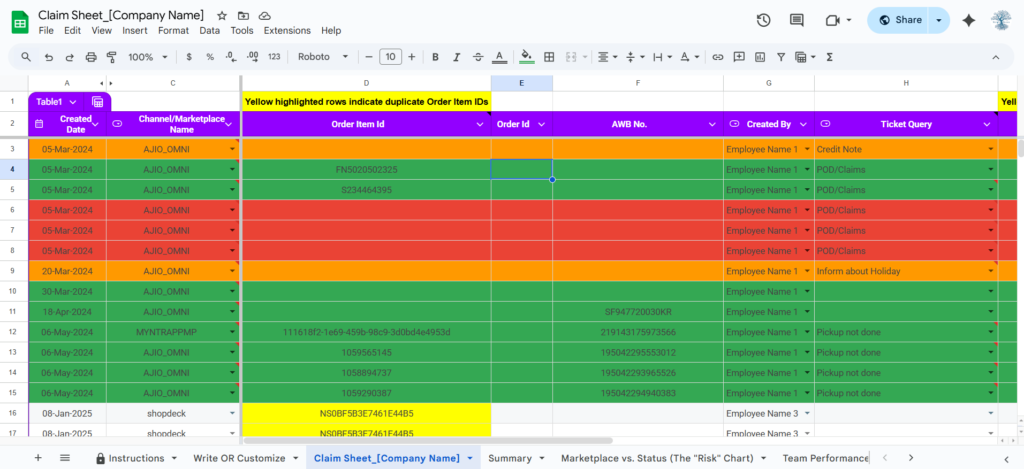
- Multi-Marketplace Support: Track claims for Ajio, Myntra, Amazon, Flipkart, Shopify, and many more in one view.
- Duplicate Detection: Automatic yellow highlighting for duplicate Order Item IDs or Ticket IDs to prevent double-logging.
- Status Management: Categorize tickets by status (Approved, Rejected, Pending) and query type.
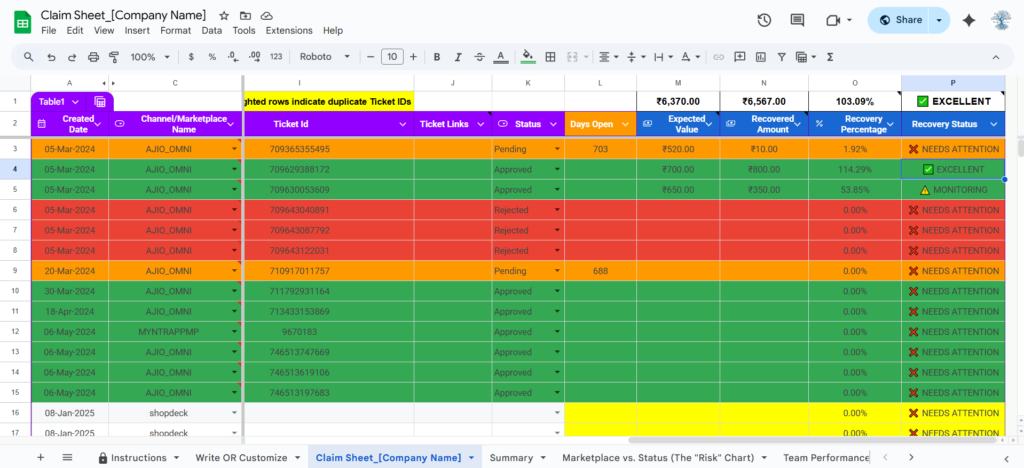
- Financial Logic: Automated calculation of “Recovery Efficiency” (The gap between what you claimed and what you received).
Why use this template?
Most sellers lose 2-5% of their bottom line simply because they forget to follow up on “Pending” tickets or lose track of “Rejected” claims that could have been appealed. This sheet eliminates that “leaky bucket” in your business.
How to Use the Template
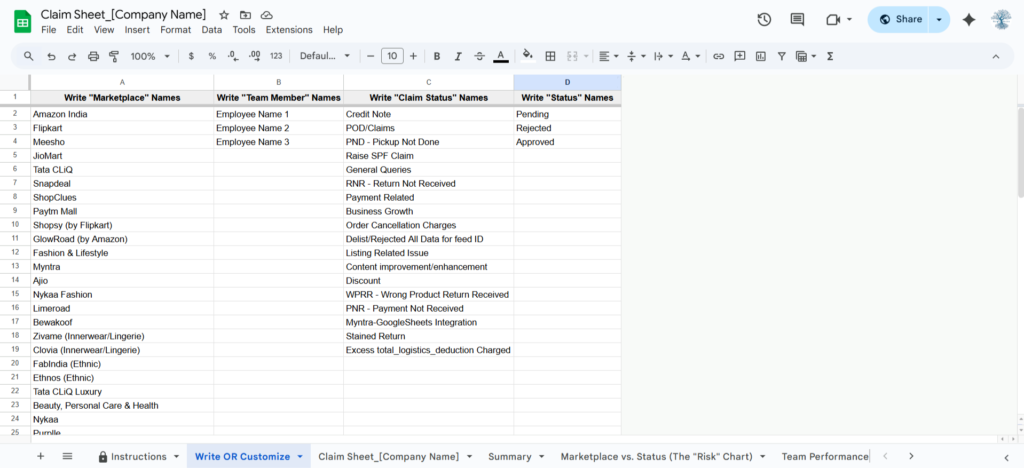
Step 1: Initial Configuration Navigate to the “Write OR Customize” tab. Here, you must define your master lists:
- Marketplace Names: Add every channel you sell on.
- Team Accountability: By listing team members, you can identify who has the highest “Rejection Rate” and improve your filing process.
- Claim/Status Names: Customize your workflow (e.g., “Approved”, “Pending”, etc.).
Step 2: Logging a Claim On the “Claim Sheet” tab, enter the details for every new ticket:
- Date & Channel: Select the marketplace and date.
- IDs: Enter the Order Item ID and Ticket ID. If the row turns Yellow, you have already logged this ID previously
- Created By: Assign the team member who raised the ticket for accountability.
- Expected Value: Always enter the value you are claiming. This is the only way to calculate your Recovery ROI.
Step 3: Managing the “Ageing” of Tickets
- Marketplace support often ignores tickets that are more than 7 days old.
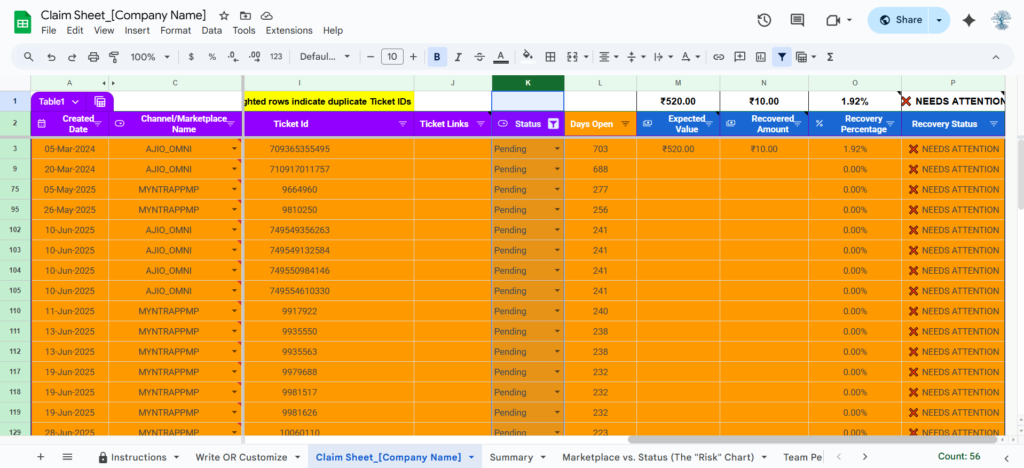
- Pro Tip: Use the Status filter to see all “Pending” tickets. If a ticket is >7 days old, it’s time to send an “Escalation” email.
Step-by-Step Operating Procedure (SOP)
Phase 1: Daily Logging At the end of every day, your team should write the “Raised Tickets Ids” or paste the IDs into this sheet.
Pro Tip: Never leave the “Created By” column blank. Accountability is key to recovery.
Phase 2: Weekly Audit Once a week, filter your Status column to show only Pending tickets.
- Check if any ticket is older than 7 days.
- Follow up on those specific IDs on the marketplace portal.
- Update the status in the sheet immediately after.
Phase 3: Monthly Settlement Reconciliation At the end of the month, compare your Approved claims against your bank settlement. Only mark them as Reimbursed when the money is actually in your account.
Understanding Your Performance Dashboard
The Simply Recon Claim Sheet goes beyond data entry by providing an automated Visual Dashboard. This allows you to audit your marketplace performance and team efficiency at a single glance.
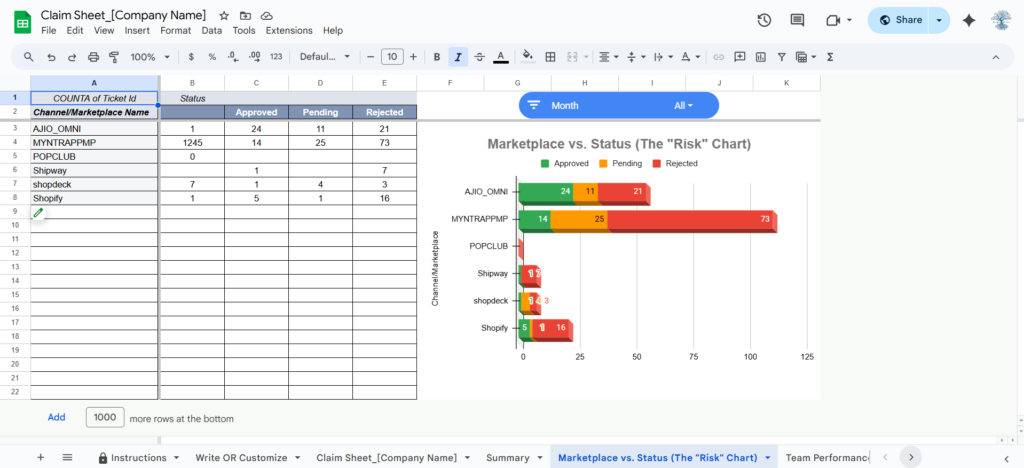
1. Marketplace vs. Status (The “Risk” Chart)
This chart visualizes which marketplaces are cooperating and which are “Profit Killers.”
- How to read it: If a specific marketplace shows a high percentage of Red (Rejected) bars, it indicates a systemic issue with your PODs (Proof of Delivery) or documentation for that specific platform.
- Business Insight: Use this to decide which marketplace requires a stricter packaging audit at your warehouse.
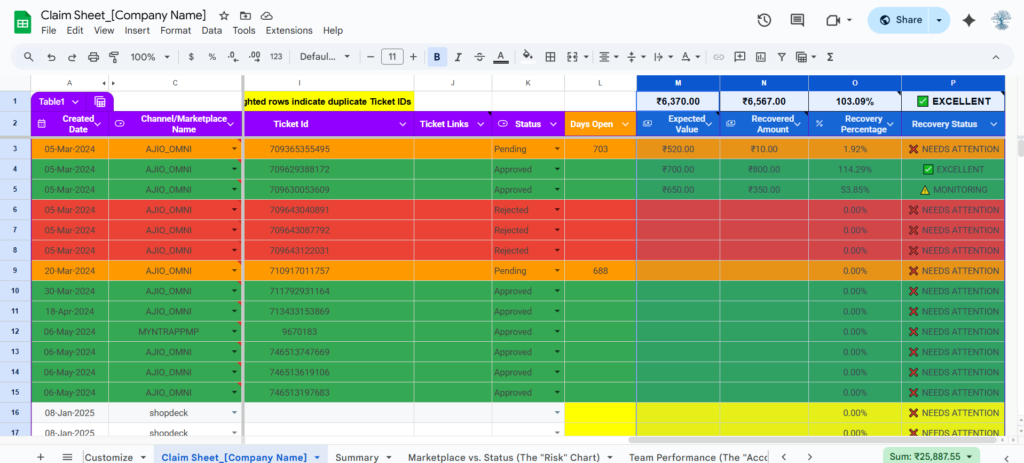
2. Financial Recovery Scorecards
Located at the very right of your dashboard, these “Live Numbers” track your actual cash flow.
- Expected Recovery: The total value of every ticket currently “In-Process.”
- Actual Recovered: The real money that has successfully been reimbursed to your account.
- Recovery %: Your overall efficiency. A healthy business should aim for a Recovery Rate of 80% or higher. If your rate is lower, it’s time to audit your claim filing process.
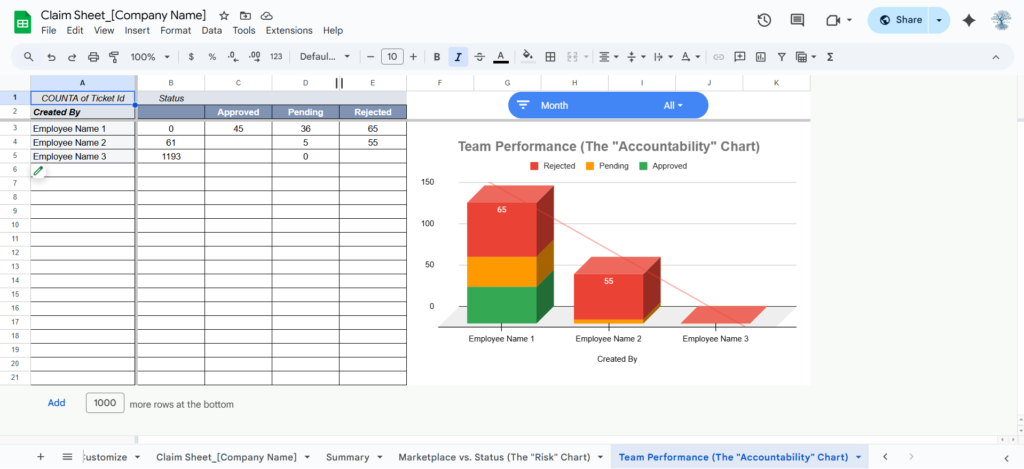
3. Team Performance (The “Accountability” Chart)
If you have multiple staff members filing claims, this chart is your “Management Tool.”
- The Goal: To ensure consistency. If one team member has a significantly higher “Approved” rate than others, have them train the rest of the team on their filing method.
- Pro Tip: Use this chart during monthly reviews to reward the team members who are most effective at recovering lost profit.
4. Interactive Data Slicers (The Filter)
The Dashboard is fully interactive. By using the Month Slicer, you can instantly filter all charts to show data for just one month only. This is essential for “Deep-Dive” audits when you are on a call with marketplace support or your category manager.
Common Troubleshooting & FAQs
- Q: Why did my row turn Yellow? A: This is our Duplicate Detection System. It means that the Order Item ID or Ticket ID you just entered already exists in this sheet. Search the sheet (Ctrl+F) to find the previous entry and update its status instead of creating a new row.
- Q: Can I add my own columns? A: Yes, you can add columns to the right of the existing ones. However, do not delete or move the primary columns (Date, Channel, Ticket ID), as these are linked to the internal logic of the sheet.
- Q: How do I handle “Partially Approved” claims? A: We recommend splitting the row or adding a “Notes” comment. If you expected ₹500 but got ₹300, log the recovered amount in your notes so you can track the “Loss on Claim.”
Setting Up Your “Claim Sheet Template_[Company Name]”
Click the following button to make a copy of the Claim Sheet Template master spreadsheet. While this template is a high-performance standalone tracker, its advanced structure is designed to be fully integrated with your other Simply Recon audit sheets through a custom automation session.
🛠️ Need Expert Help with this File?
While this sheet is designed to be Plug & Play, we know that marketplace reports can sometimes be messy or complex. If you are stuck with a formula error, have unique SKU data, or want a professional audit of your template or reconciliation, don’t waste hours trying to fix it yourself.
Book a 1-on-1 Remote Support Session:
- What you get: 30 minutes of private screen-sharing (Zoom/Google Meet).
- Direct Help: I will troubleshoot your specific data and fix your sheet ‘live’.
- Efficiency: Get your templates marketplaces reconciliation finished today.
💡 Pro Tip: To lock in your preferred time, please complete the payment immediately after scheduling. Once paid, you will receive a confirmation email with the Google Meet link and a Pre-Appointment Checklist to help us fix your data faster!
Please read the Pre-Appointment Checklist before booking to ensure we make the most of our time.
⚠️ Important Note: Maintaining Template Integrity
Always use “Paste as Values” When moving data from your marketplace reports or other Excel files into this template, never use a standard paste (Ctrl+V). Doing so will overwrite the pre-configured formatting and logic of the cells.
To keep the template working correctly:
- Windows Shortcut: Press Ctrl + Shift + V
- Mac Shortcut: Press Cmd + Shift + V
By using this shortcut, you ensure that only the raw data (Text/Numbers) is pasted, leaving the template’s background colors, borders, and Apps Script connections untouched.
📜 License & Support Policy
Single-User License: This file is for your internal business use only. Redistribution or sharing this link with other sellers is strictly prohibited and monitored. Each purchase is linked to your registered email at Simply Recon.
Our Support Policy:
- Self-Service: Documentation is available here 24/7 for free.
- Product Bugs: If the original file has a technical error, we fix it for free.
- Personalized Assistance: If you have modified the sheet, have complex data issues, or need one-on-one training, please book a Paid Remote Appointment above.


